

Settings
Installation, projects, tour appearance, metric tree data collection, and agents.
Open Settings from the dashboard. Changes on the Projects, Tours and Metric Tree tabs are saved with Save Settings; Installation and Agents save as you go.
Installation
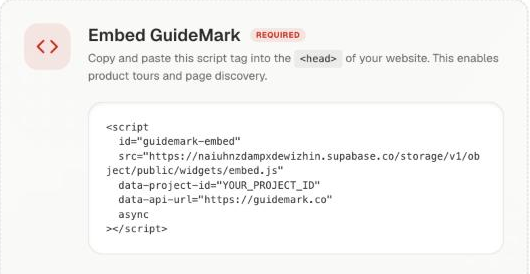
- Embed GuideMark: the script tag for this project, ready to copy. See Install GuideMark.
- Connect Google Analytics: adds analytics data to the metric tree.
Projects
- Project Name and Project Domain / Home URL. Tours only run on this domain, and the editor and share links open there.
- Module Overview: counts of tours, checklists and discovered pages.
- Danger Zone → Delete Project.
Tours
How tours and tooltips look on your site, with a Live Preview:
- Tooltip Style: Auto-detect takes colours and font from your site; or set your own, with Solid, Glass or full-colour styles.
- Theme Mode: light or dark.
- Colours (background, button, button text), Font Family, and button size and radius.
- Playback Button Position: where the replay button sits.
Metric Tree
- Background Snapshots: Off, Weekly or Daily screenshots of your pages for the metric tree and its AI diagnosis, plus Capture Now.
- Frustration Tracking: detects rage clicks, dead clicks and JavaScript error bursts as evidence for AI diagnosis. Signals are anonymized and batched.
Agents
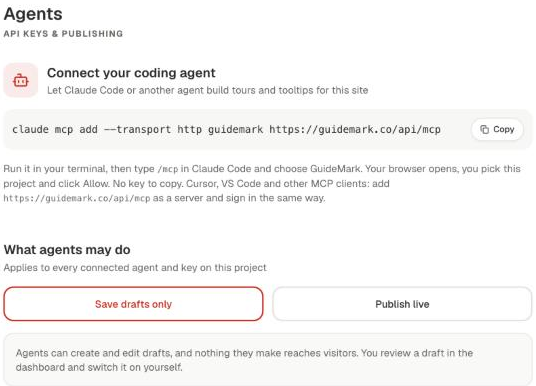
- Connect your coding agent: the one command to add GuideMark to Claude Code or another MCP client.
- What agents may do: Save drafts only (default) or Publish live.
- Connected agents: every signed-in agent and API key, when it was last used, and Disconnect or Revoke. API key creates a key for scripts and CI.
See Agents.