

Tours & Tooltips
The dashboard's home: every tour and tooltip in the selected project, and the controls for each.
Pick a project with the switcher at the top left. The status next to it shows Connected when the widget has checked in from your site.

Tour cards
Each tour card shows its title, page, when it was last changed, whether it's Active (live) or Inactive (draft), its number of steps and how often it has been viewed. 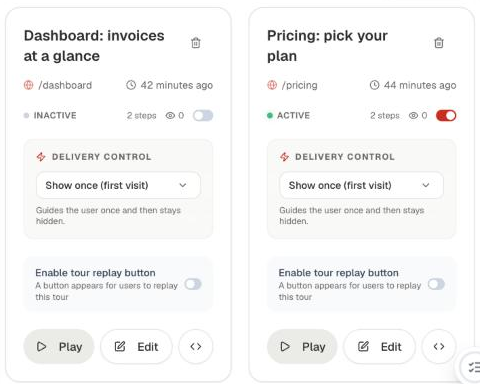
On the card:
- The switch puts the tour live or takes it down. One tour is live per page.
- Delivery Control sets how often a user sees it: once, weekly (twice at most) or monthly (three times at most).
- Enable tour replay button adds a help button so users can replay the tour.
- Play opens the tour on your site, drafts included.
- Edit opens the editor on your site with this tour loaded.
- The code button shows a share link that plays the tour (
?playTour=), with a copy button. - The bin deletes the tour.
New Tour and Configure
New Tour asks which page to start on and opens the recorder there; see Create your first tour. Configure opens Settings.
Tooltips
Beacon tooltips are listed below the tours, with their trigger. Create and place them in the editor on your site; see Beacon tooltips.