

Onboarding checklists
A list of first steps that ticks itself off as users do them, by visiting a page, finishing a tour, or on your signal.
Create checklists in the dashboard under Checklists → New Checklist. Each item says how it gets completed.
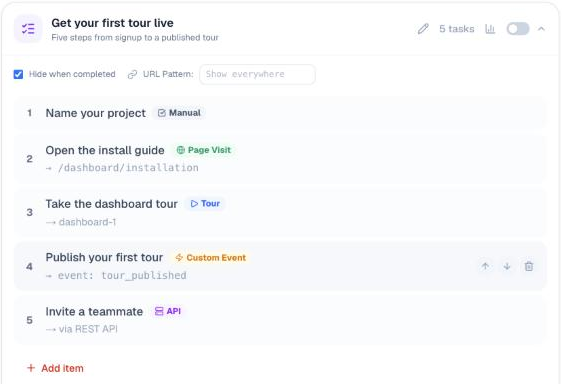
How items complete
| Type | Completes when… | What you do |
|---|---|---|
| Manual | the user ticks it | nothing |
| Tour | the user finishes a linked tour | pick the tour |
| Page Visit | the user visits a page | pick a discovered page, or type a path |
| Custom Event | your app reports an event | call ProductTour.complete('event_name') (details) |
| API | your server reports it | call the checklist API |
Where a checklist shows
Set a URL Pattern on the checklist to limit it to some pages. Leave it empty to show it everywhere.
/settings        only on /settings
/onboarding/*    on /onboarding/step1, /onboarding/step2, …
(empty)          on every page
Tick Hide when completed to remove the checklist once every item is done.
Floating or embedded
By default a checklist opens from a floating button. To show it inside your own UI instead, for example in a sidebar, use ProductTour.embedChecklist().
Progress per user
Progress is saved per browser until you tell GuideMark who the user is. Call ProductTour.identify(userId) after sign-in, or put data-user-id on the script tag, and progress follows them to any device.
Analytics
Open a checklist's Completion Analytics to see how many users finished each item, as a step funnel.