

Publishing and delivery
Live versus draft, one live tour per page, how often a tour shows, the replay button and share links.
Live and draft
Every tour and tooltip is either live (switched on: visitors see it) or a draft (switched off: saved, not shown). Use the switch on its card in the dashboard.
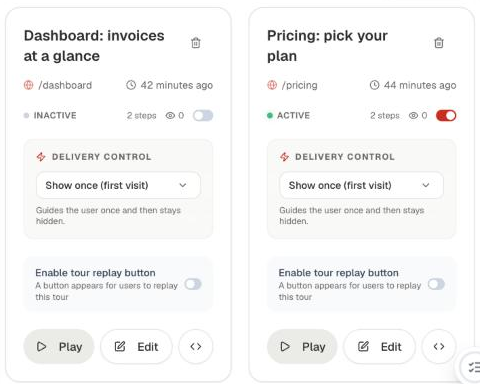
Only one tour can be live per page. Switching a tour on switches off the page's other live tour.
How often a tour shows
Set Delivery Control on the tour card:
| Option | Behaviour |
|---|---|
| Show once (first visit) | Guides the user once, then stays hidden. |
| Weekly (2x max) | Shows again weekly, at most twice. |
| Monthly (once a month, 3x max) | Shows again monthly, at most three times. |
Replay button
Turn on Enable tour replay button to give users a help button that replays the tour. Choose where it sits in Settings → Tours → Playback Button Position.
Share and test links
The code button on a tour card shows a link that plays the tour on demand, on your own site:
https://app.example.com/pricing?playTour=mYYDrThe link also plays drafts, so it's the way to preview a tour (or one an agent wrote) before you switch it on. Play on the card opens the same link.
When tours stop showing
Tours, tooltips and checklists are shown while your account is on a trial or a paid plan. If a trial ends without a subscription, they stop showing to visitors. Nothing is deleted, and subscribing brings everything back on the next page load.