
GuideMark

An MCP server. No API key to copy.

Your coding agent drafts the tours. You publish them.

Your agent already knows your routes, components and selectors. Connect it to GuideMark and it can create product tours and tooltips on your real pages. Everything it makes is a draft that waits for you, and you decide whether it may ever publish on its own.

Connect

One command, then click Allow

There is no key to create or paste. Your agent signs in with GuideMark in the browser and gets access to the one project you pick.

  1. Add GuideMark to your agentOne command in Claude Code, or the server address in any other client. Settings → Agents has both, ready to copy.
  2. Sign inType /mcp, choose guidemark and authenticate. GuideMark opens in your browser: pick the project and click Allow.
  3. Ask for a tourDescribe it the way you would to a colleague. The agent can read your code for selectors that really exist.

Works with

Claude Code
Run this, then sign in from /mcp.
claude mcp add --transport http guidemark https://guidemark.co/api/mcp
Cursor, VS Code and other MCP clients
Add a remote (HTTP) MCP server with this address and sign in when asked.
https://guidemark.co/api/mcp
Clients that can’t sign in
Send an API key from Settings → Agents as a header.
Authorization: Bearer gm_…
Scripts and CI
Call the REST API with an API key. Same actions, same rules.
https://guidemark.co/api/v1
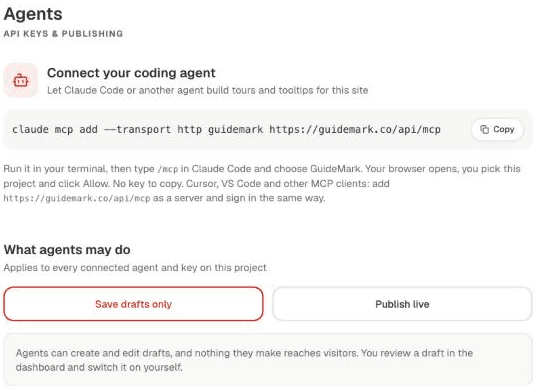
GuideMark's Settings → Agents screen: the connect command with a Copy button, and What agents may do set to Save drafts only.

Control

Nothing goes live until you say so

An agent can misread your product. So whatever it makes waits for you, and you choose how much it may do on its own.

Drafts by default
Tours and tooltips an agent creates are switched off: saved in your dashboard, never shown to visitors.
Publishing takes two yeses
The project has to allow agent publishing, and you have to tick Also let it publish live when you connect that agent. Without both, it can’t publish, edit or delete anything that’s live.
An email when a draft is ready
The agent can ask you to review a finished draft. You get an email with a link to it, at most once per draft per hour.
One project, easy to cut off
Each connection works on one project, up to 60 requests a minute. Disconnect it in Settings → Agents and it loses access straight away.

Ask for onboarding the way you ask for code

  • A page you just shipped

    A tour for the new page

    Name the route and the steps. The agent reads the page’s code for selectors that exist in it, and the tour is saved as a draft.

  • A feature you just added

    A tooltip on the new button

    Point at the button by its data attribute. The agent adds a beacon tooltip as a draft and asks you to review it, so you hear about it by email.

  • After a refactor

    Tours that keep up with your code

    Rename a selector and ask the agent to fix the tours that used it. GuideMark won’t let it change a live tour unless it may publish, so that one waits for you.

Name the page, describe the steps, and say draft. Ask for ids or data attributes from your code: unlike generated class names, they still match after the next build.

FAQ

Coding agent FAQ

Yes, at https://guidemark.co/api/mcp (Streamable HTTP). Agents connect by signing in with GuideMark in the browser, so there is no API key to copy. Its tools read the project, create and edit tours and beacon tooltips, publish when you allow it, and email you when a draft is ready for review. Scripts and CI can use the REST API at https://guidemark.co/api/v1 with an API key instead.

Claude Code connects with one command: claude mcp add --transport http guidemark https://guidemark.co/api/mcp. Cursor, VS Code and other MCP clients that support remote servers add the same address and sign in the same way. Clients that can't sign in can send an API key from Settings → Agents instead, and scripts or CI can call the REST API at https://guidemark.co/api/v1.

Not by default: agents save drafts only. An agent can put something live, or change or delete anything that is live, only if the project allows agent publishing in Settings → Agents and you gave that agent publish access when you connected it. When a draft is finished, the agent can ask for a review, which emails the project owner a link to it.

No. MCP clients sign in with GuideMark in the browser (OAuth 2.1 with PKCE): you pick a project and click Allow, and the agent gets a token for that project alone, which expires after an hour and renews itself until you disconnect it. API keys are for the REST API and for clients that can't sign in.

Product tours, with each step pointing at an element by its CSS selector, and beacon tooltips, which open from a pulsing dot, on hover or on click. It can also list, edit and delete them, and ask you to review a draft. Checklists, tooltip styling and the metric tree are set up in the dashboard.

Yes. The MCP server and the REST API come with every GuideMark plan, at no extra cost. Plans are priced by monthly active users and start at €24/mo.

Let your agent write the first draft.

Start free, add the script tag to your app, then connect your agent with one command.